Skip to content
Two Failed Drives: RAID 5 Data Recovery from a Netgear NAS in Hyderabad
- Case Overview : RAID 5 Data Recovery for a Hyderabad Media Agency
- Problem Description: RAID 5 with Two Failed Drives
- Understanding the Challenge: Why RAID 5 Recovery Fails with Two Drives
- RAID 5 Data Recovery in Our Lab: Repair, Clone, Rebuild
- Outcome of the RAID 5 Data Recovery
- Lessons from This Case: How to Protect a NAS
- RAID 5 Data Recovery: Frequently Asked Questions
- What happens if two drives fail in RAID 5?
- How many drives can fail in a 4-drive RAID 5?
- How do I recover data from a Netgear NAS drive?
- Does a factory reset on a Netgear ReadyNAS erase the data?
- Should I rebuild RAID 5 after a drive fails?
- Can RAID 5 data recovery software fix two failed drives?
- How long does RAID 5 data recovery take?
- Do you offer NAS data recovery in Hyderabad?
- RAID 5 NAS Showing Two Failed Drives?
Case Overview : RAID 5 Data Recovery for a Hyderabad Media Agency
This RAID 5 data recovery for a Hyderabad media agency started when two drives failed in their Netgear NAS. The NAS held 8.97TB of their work: raw shoot footage, edited ad films, photos and design files. A RAID 5 array survives one failed drive, but not two. So the shared volume went offline, and the whole team lost access. Our engineers repaired and cloned the failed drives, rebuilt the RAID in our lab and recovered all 8.97TB.
We handle NAS and RAID data recovery for businesses in Hyderabad, Pune, Pimpri-Chinchwad and all over India, with free pickup from your office.
- Brand : Netgear ReadyNAS (4-bay)
- Drives : 4 × Seagate IronWolf 4TB
- RAID Level : RAID 5
- Problem : 2 drives with hardware failure
- Data Size : 8.97TB
- Success Rate : 100%
Problem Description: RAID 5 with Two Failed Drives
For years, the 4-bay Netgear NAS ran quietly in the agency’s office. Their editors saved every project to it, and the team opened files straight from the shared folders. Inside, four 4TB Seagate IronWolf drives worked as one RAID 5 volume, which can survive the loss of any single drive.
Then one drive failed, and the NAS reported a degraded volume. Because RAID 5 keeps working with one missing drive, the team carried on while they waited for a replacement. However, a few days later, a second drive began to click and dropped out too. At that point, the volume went offline.
Next, the admin page showed the message “Remove inactive volumes to use the disk”, and a local vendor suggested a factory reset. Fortunately, the agency’s IT team knew that both steps would erase the disks. So they powered the NAS off and called us.
The symptoms included:
- A “degraded” warning after the first drive failed
- Clicking from a second drive, then constant disconnects
- The shared volume offline, so no editor could open a project
- An offer to remove the inactive volume, which would have destroyed the data
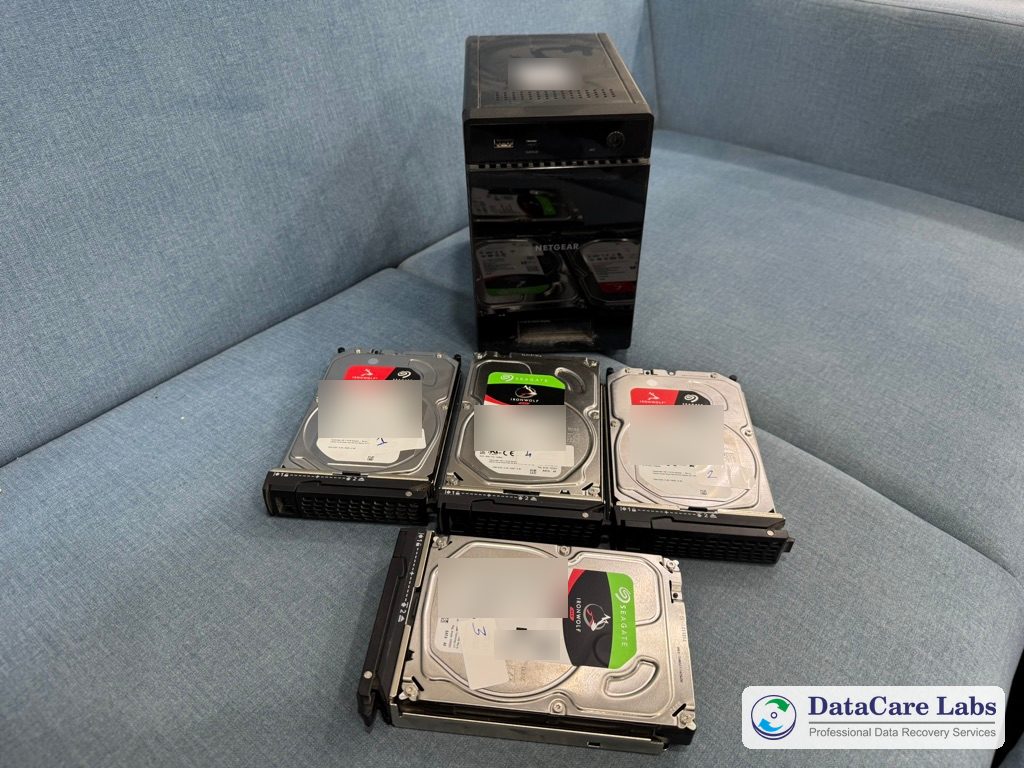
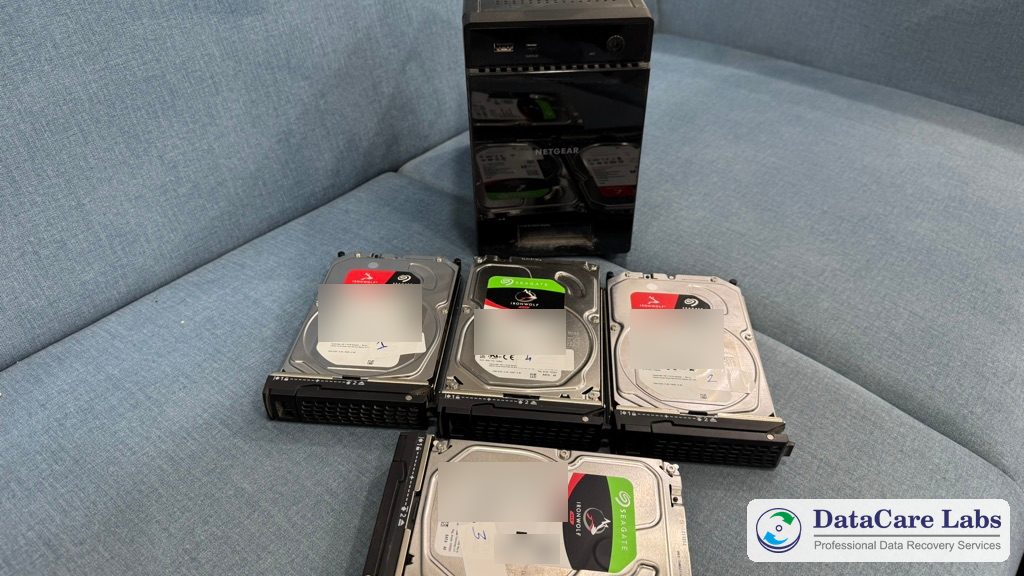
The photo above shows the NAS and its four drives at our lab. Our engineers wrote the bay number on each drive before the Netgear NAS data recovery began. We also blurred the drive labels and serial numbers for privacy.
Understanding the Challenge: Why RAID 5 Recovery Fails with Two Drives
RAID 5 spreads data and parity across all the drives. Parity is extra information that lets the NAS rebuild the contents of any one missing drive. So with one failed drive, every file is still there. However, when two drives fail in RAID 5, the parity is no longer enough, and the NAS cannot assemble the volume at all.
That is why RAID 5 with two failed drives is so risky. The data still exists on the disks, yet one wrong repair step can destroy it. For example, a factory reset creates a new, empty volume over the old one. Likewise, a forced rebuild can overwrite good data with wrong parity. Recovery software cannot help either, because it needs drives that read reliably, and these two had physical faults.
Moreover, the drive that failed first held older data. The array kept running for days without it, so the newest projects existed only on the other three drives. As a result, a correct rebuild had to use the right three drives and leave the stale data out.
The same rules apply to a server with a RAID card. Read more about why a RAID 5 rebuild can cause permanent data loss and what to do when a NAS beeps or becomes inaccessible.
RAID 5 Data Recovery in Our Lab: Repair, Clone, Rebuild
For this NAS data recovery, we collected the NAS and all four drives from Hyderabad for free. Then our engineers followed our step-by-step process:
- Numbered each drive by its bay, because the drive order matters in a RAID
- Tested every drive. Two had hardware faults: one had a failed read head, and the other had a weak head and thousands of bad sectors
- Replaced the failed head assembly with a matching donor part in our clean-room workstation
- Cloned all four hard disks sector by sector to healthy lab drives, and read the weak areas slowly
- From then on, worked only on the clones, so nothing was ever written to the original drives
- Read the RAID details that the NAS stores on each drive: disk order, stripe size and parity layout
- Rebuilt the RAID 5 array virtually from the three up-to-date clones, then used the older drive to double-check the result
- Opened the NAS volume read-only and copied all the folders out
A Netgear ReadyNAS uses Linux software RAID, so a Windows PC sees only unreadable partitions on each drive. That is one reason why Netgear NAS data recovery needs every drive, the right bay order and lab tools. In fact, plugging the drives into a PC often makes things worse, because Windows offers to format them.
Next, we checked the result. We compared the folder tree and file counts with the agency’s list, and we played sample videos from every project folder. Everything opened, including the last edits saved before the crash.
Most NAS data recovery jobs with healthy drives finish within 24 to 48 hours after quote approval. Cases with failed drives take longer, because the drives need repair first. Our data recovery charges page explains how pricing works.
Outcome of the RAID 5 Data Recovery
This Netgear NAS data recovery returned 100% of the agency’s data: all 8.97TB, with every folder, file name and project intact. Also, the raw footage, finished ad films, photos and design files all opened normally. For media teams, our video recovery service also repairs single damaged clips.
We copied everything to new drives that the agency supplied, and then we sent them back to Hyderabad. Our security measures kept the client’s footage confidential from start to finish, and we erased our copy 7 days after delivery.
More NAS and RAID cases: Synology NAS RAID 6 in Shillong, WD My Cloud Home Duo in Delhi, Seagate IronWolf 14TB NAS drive in Mumbai and Dell R740 server RAID 6 in Amritsar. For more data recovery in Hyderabad, see the Seagate Exos 12TB and Samsung 980 Pro 2TB cases, or browse all data recovery case studies and customer reviews.
Lessons from This Case: How to Protect a NAS
RAID 5 protects you from one drive failure. It is not a backup. Therefore, every business NAS needs a few simple habits. In fact, most Netgear NAS data recovery jobs we see begin with one of them skipped:
- Replace a failed drive at once, and keep a spare of the same size on the shelf
- Back up the NAS to separate drives or to the cloud, and test a restore now and then
- Act on the health alerts that the NAS sends, and learn the signs of a failing hard drive
- If a second drive clicks or drops out, power the NAS off. Do not rebuild, reset or run recovery software (see what to do when a hard drive clicks)
- Label each drive with its bay number before you take it out
For a full overview, read our guide to RAID and NAS recovery.
RAID 5 Data Recovery: Frequently Asked Questions
Answers for businesses in Hyderabad, Pune, Pimpri-Chinchwad or anywhere in India whose RAID 5 NAS or server has failed drives.
RAID 5 NAS with failed drives? Call +91 9859 070809 — the analysis is free.
RAID 5 NAS Showing Two Failed Drives?
Power the NAS off and leave the drives in their bays. Do not rebuild, reset or run recovery software. Instead, call our engineers. We check every drive for free and tell you what we can recover before you pay anything.
We offer free pickup for NAS and RAID data recovery from Hyderabad, Pune, Pimpri-Chinchwad and anywhere in India. If you courier the drives yourself, follow our packing instructions and mark each drive with its bay number.
📞 Call DataCare Labs: +91 9859070809
🚚 Free Pickup & Delivery Available
🔒 100% Confidential Recovery Process
⚡ Free Analysis & Evaluation
✅ High Success Rate Data Recovery Services
Contact DataCare Labs today for expert RAID and NAS recovery.
Related
- Data Recovery Services in Pune
- Free Pickup in Hyderabad
- Data Recovery in Pimpri-Chinchwad
- RAID Data Recovery
- NAS Data Recovery
- Server Data Recovery
- Data Recovery Cost
- RAID 5 Rebuild Failure
- Synology NAS RAID 6 Recovery in Shillong
- Seagate Exos 12TB HDD Recovery in Hyderabad
- Imation 1TB External SSD Recovery in Pune
- Data Recovery FAQ
- Contact DataCare Labs, Pune
Trusted by Customers Across India
DataCare Labs is trusted across Pune, all over India and by customers overseas for professional data recovery. With advanced tools, certified clean-room facilities, and expert engineers, we deliver secure, fast, and reliable recovery solutions—whether you’re in Maharashtra or overseas. Experience unmatched care and precision for your valuable data.

Hello all, I’m Ishwar from Akole Sangamner. I am a professional photographer. I had my 500gb hard drive, which was not detectable by any system. But I’m very thankful to Datacare Labs to recover my all data from Seagate hard drive. I recommend to everyone this is the best Seagate data recovery center in pune.

Excellent service! I thought I had lost all my data when my HDD died, but the technically sound team at DataCare Labs was able to recover everything. They were professional, quick, and kept me informed throughout the process. Highly recommend them for any data recovery needs!

This team is a perfect example of what they say that’s only they delivers. Special thanks to Amol sir, for making my data recovery a smooth process. It was a very nice experience, and I’m very thankful for their efforts

Professionals from DataCare labs were like saviours for me. I lost my entire work data but the team was able to recover it successfully. The service was superfast as well. Thank you team.

Thanks to DataCare Labs for the recovery of my data from my hard disk. I thought I lost all my data and would never be able to recover it but it got recovered. And they explain everything very well in detail before starting the process and only after your approval they move ahead.

I recently experienced a hard disk failure, and DataCare Labs came to the rescue. Their HDD data recovery service is top-notch. The team at DataCare Labs in Baner, Pune, managed to recover all my important files and documents. I am extremely satisfied with their prompt and reliable service.

DataCare Labs saved me twice! Four years ago, they recovered my 2TB data after a virus wiped everything. Recently, they rescued my 1TB external hard drive after physical damage. Both times, they worked like magic—quick, professional, and at a reasonable cost. If you’ve lost data due to deletion, damage, or even a burnt drive, don’t panic—just go to DataCare Labs. Highly recommend for their expertise and excellent service! 🚀

These guys are extremely professional, offer solutions, have the expertise needed, and go above and beyond to be helpful. They patiently explain what is possible and not, offer alternatives, and are patient with non-tech people like me. I recommend 10/10 for any of your data recovery needs in Pune.

DataCare Labs offers top-notch service with a great work culture. They respond promptly, address all queries, and recover even corrupt data at reasonable rates. Their drive collection and delivery are seamless, and they keep you updated throughout the process. You can verify recovered data before payment, and they securely store a backup until confirmation. Regular updates via email, SMS, and WhatsApp make the experience smooth. Their service matches global standards—highly recommended! Special thanks to Mr. Amol Khadse. Wishing DataCare Labs continued success

After my laptop’s 1TB hard drive crashed, local recovery centers couldn’t help and charged high fees. After three weeks of frustration, a friend recommended DataCare Labs. They diagnosed my drive for free in just 5 minutes, explained the issue, and recovered all my data within two days at a reasonable price. Highly professional with advanced tools—truly a lifesaver! Highly recommended!