Skip to content
Tea Spilled on a Laptop: Liquid Damaged Samsung 980 SSD Recovery in Pune
- Case Overview : Liquid Damaged SSD Recovery for a Pune CA Firm
- Problem Description: Tea Spilled on the Laptop
- Understanding the Challenge: Why Liquid Damaged SSD Recovery Needs a Lab
- Samsung 980 SSD Recovery: What Our Lab Did
- Outcome of the Liquid Damaged SSD Recovery
- Liquid Damaged SSD Recovery: Frequently Asked Questions
- Tea spilled on my laptop. What should I do?
- Is liquid damaged SSD recovery possible?
- What happens if you spill tea on your laptop?
- How long does SSD data recovery take after a spill?
- Do you collect liquid damaged laptops in Pune and Pimpri-Chinchwad?
- Can I send a water damaged SSD from another city in India?
- What does liquid damaged SSD recovery cost?
- Is my data safe with you?
- Spilled Tea or Water on Your Laptop?
Case Overview : Liquid Damaged SSD Recovery for a Pune CA Firm
This liquid damaged SSD recovery began when tea spilled on a Pune CA firm’s laptop and killed its Samsung 980 SSD. The laptop shut down at once. Because the 1TB NVMe drive held client files and Tally data, the firm needed it back before the income tax deadline. At our data recovery lab in Pune, engineers repaired the tea damage on the SSD board and recovered 100% of the data within 48 hours.
We see liquid-damaged laptops and drives from Pune, Pimpri-Chinchwad and the rest of India all year round. This case shows what happens inside the lab, step by step.
- Brand : Samsung 980
- Capacity : 1TB
- Interface : M.2 NVMe
- Problem : Tea spill (liquid damage)
- Turnaround : 48 hours
- Success Rate : 100%
Problem Description: Tea Spilled on the Laptop
In late July, days before the 31 July income tax return deadline, a cup of hot tea tipped over onto a partner’s laptop. The laptop switched itself off. After the firm let it dry for a day, it started again but showed “No bootable device”. Even the BIOS no longer listed the SSD.
The drive held years of client records: Tally company data, income tax working files, GST returns and scanned documents. However, the last full backup was months old. So losing the drive meant redoing weeks of work in the busiest season of the year.
The symptoms included:
- Laptop shut down right after the tea spill
- “No bootable device” error on start-up
- SSD missing from the BIOS, and also from a second computer that a local repair shop tried
- Brown, sticky residue on the SSD board
Understanding the Challenge: Why Liquid Damaged SSD Recovery Needs a Lab
Liquid harms an SSD in two ways. First, it can short-circuit the board while power is on. Then the dried residue slowly corrodes the tiny components and their contacts. Tea makes this worse, because its sugar and milk leave a sticky crust that holds moisture.
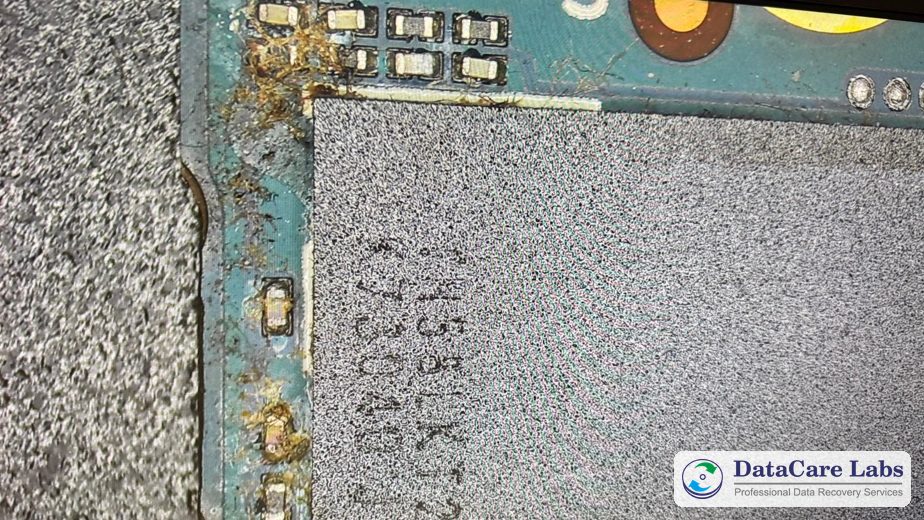
Under our microscope, this Samsung 980 showed exactly that. Dried tea residue, mixed with dust and fibres, surrounded the capacitors next to the main chip. Also, one capacitor already had a crust of corrosion on its contacts.
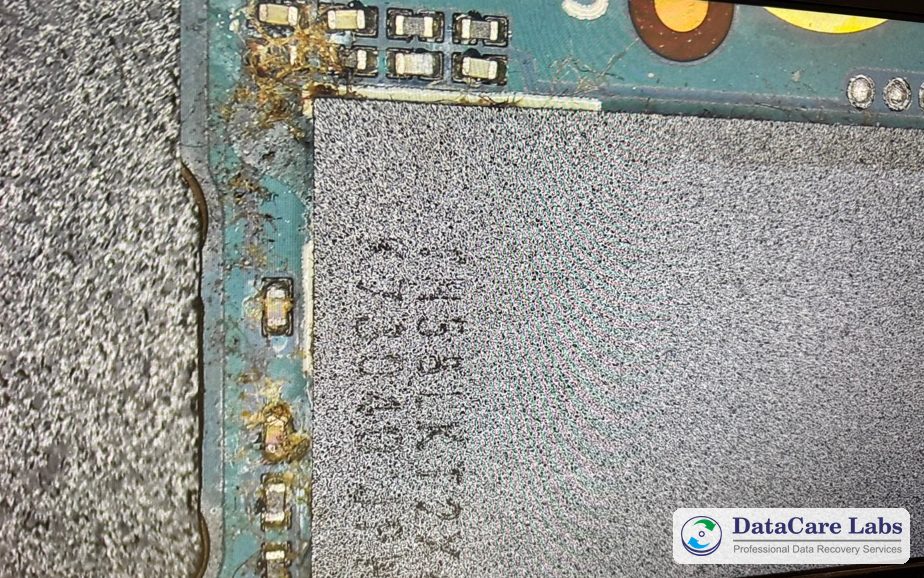
There was a second problem. On a modern NVMe SSD like the Samsung 980, the controller chip scrambles and maps every piece of data it stores. So we could not simply move the memory chips to another board. Instead, the original board had to work again, without a single extra short circuit.
For the wider picture, read our guide to SSD data recovery and why an SSD can die without warning.
Samsung 980 SSD Recovery: What Our Lab Did
Our engineers followed our usual step-by-step recovery process:
- Inspected the whole board under the microscope, with no power connected
- Cleaned off the tea residue and corrosion in an ultrasonic bath of isopropyl alcohol, then dried the board fully
- Replaced the corroded capacitor with a new part of the same value
- Tested the power lines for short circuits before the first power-on
- Powered the SSD from a lab bench supply and confirmed that the controller responded
- Made a full sector-by-sector copy (image) of the 1TB drive with professional imaging hardware
- Rebuilt the folders from that copy and opened sample files, including the Tally company data
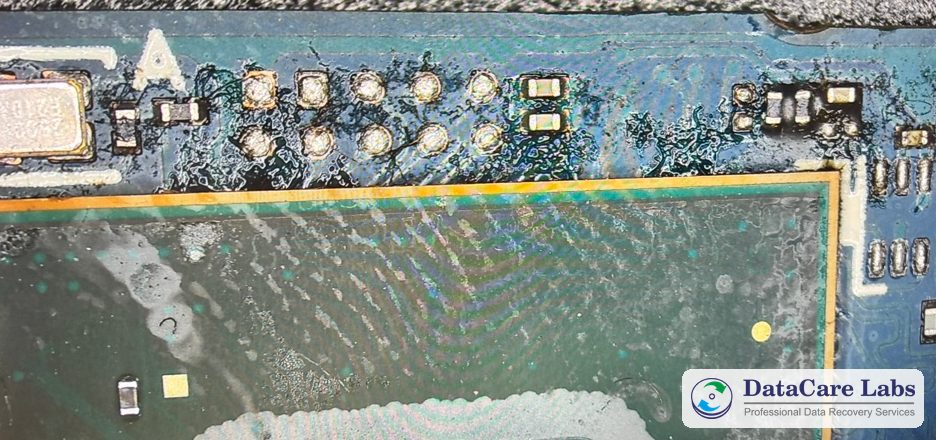
The photo above shows how far the tea had spread before cleaning: a dark film around the test pads, and dried tide marks across a chip.
We worked from the copy, not the original drive, so every check carried zero extra risk. The whole job took 48 hours from quote approval.
Outcome of the Liquid Damaged SSD Recovery
We recovered 100% of the data from the 1TB Samsung 980, with the original folder structure intact. The Tally company data opened without errors, and the firm met its filing deadline.
Then the firm downloaded everything through a secure cloud link, which we release only after OTP verification. Our security measures explain each step. Finally, we kept our copy for 7 days in case the firm needed it again, and then erased it permanently.
More SSD recovery cases from our Pune lab: a Samsung 870 EVO 1TB, a Kingston SSD and a Samsung 850 EVO. You can also browse all data recovery case studies or read customer reviews.
Liquid Damaged SSD Recovery: Frequently Asked Questions
Straight answers for anyone in Pune, Pimpri-Chinchwad or anywhere in India who has spilled tea, coffee or water on a laptop or SSD.
Spilled something on a laptop just now? Call +91 9860 070809 — the analysis is free.
Spilled Tea or Water on Your Laptop?
Switch it off, unplug the charger and stop turning it on. Every power-on can spread the damage. Instead, call our engineers. We check the drive for free and tell you what we can recover before you pay anything.
We offer free pickup across Pune and Pimpri-Chinchwad, and from anywhere in India. If you courier the drive yourself, follow our packing instructions first.
📞 Call DataCare Labs: +91 9860070809
🚚 Free Pickup & Delivery Available
🔒 100% Confidential Recovery Process
⚡ Free Analysis & Evaluation
✅ High Success Rate Data Recovery Services
Contact DataCare Labs today for expert SSD data recovery.
Related
Trusted by Customers Across India
DataCare Labs is trusted across Pune, all over India and by customers overseas for professional data recovery. With advanced tools, certified clean-room facilities, and expert engineers, we deliver secure, fast, and reliable recovery solutions—whether you’re in Maharashtra or overseas. Experience unmatched care and precision for your valuable data.

Hello all, I’m Ishwar from Akole Sangamner. I am a professional photographer. I had my 500gb hard drive, which was not detectable by any system. But I’m very thankful to Datacare Labs to recover my all data from Seagate hard drive. I recommend to everyone this is the best Seagate data recovery center in pune.

Excellent service! I thought I had lost all my data when my HDD died, but the technically sound team at DataCare Labs was able to recover everything. They were professional, quick, and kept me informed throughout the process. Highly recommend them for any data recovery needs!

This team is a perfect example of what they say that’s only they delivers. Special thanks to Amol sir, for making my data recovery a smooth process. It was a very nice experience, and I’m very thankful for their efforts

Professionals from DataCare labs were like saviours for me. I lost my entire work data but the team was able to recover it successfully. The service was superfast as well. Thank you team.

Thanks to DataCare Labs for the recovery of my data from my hard disk. I thought I lost all my data and would never be able to recover it but it got recovered. And they explain everything very well in detail before starting the process and only after your approval they move ahead.

I recently experienced a hard disk failure, and DataCare Labs came to the rescue. Their HDD data recovery service is top-notch. The team at DataCare Labs in Baner, Pune, managed to recover all my important files and documents. I am extremely satisfied with their prompt and reliable service.

DataCare Labs saved me twice! Four years ago, they recovered my 2TB data after a virus wiped everything. Recently, they rescued my 1TB external hard drive after physical damage. Both times, they worked like magic—quick, professional, and at a reasonable cost. If you’ve lost data due to deletion, damage, or even a burnt drive, don’t panic—just go to DataCare Labs. Highly recommend for their expertise and excellent service! 🚀

These guys are extremely professional, offer solutions, have the expertise needed, and go above and beyond to be helpful. They patiently explain what is possible and not, offer alternatives, and are patient with non-tech people like me. I recommend 10/10 for any of your data recovery needs in Pune.

DataCare Labs offers top-notch service with a great work culture. They respond promptly, address all queries, and recover even corrupt data at reasonable rates. Their drive collection and delivery are seamless, and they keep you updated throughout the process. You can verify recovered data before payment, and they securely store a backup until confirmation. Regular updates via email, SMS, and WhatsApp make the experience smooth. Their service matches global standards—highly recommended! Special thanks to Mr. Amol Khadse. Wishing DataCare Labs continued success

After my laptop’s 1TB hard drive crashed, local recovery centers couldn’t help and charged high fees. After three weeks of frustration, a friend recommended DataCare Labs. They diagnosed my drive for free in just 5 minutes, explained the issue, and recovered all my data within two days at a reasonable price. Highly professional with advanced tools—truly a lifesaver! Highly recommended!