WD Warranty Claim & Data Recovery Support
Your Western Digital (WD) drive has failed and you need two answers: how a WD warranty claim works, and how to get your files back. So this page brings together WD’s official warranty, RMA and India drop-point links, explains what a warranty replacement does and does not cover, and shows how DataCare Labs recovers data from failed WD hard drives, external drives, NAS drives and SSDs.
DataCare Labs is an independent data recovery laboratory in Pune, India. We are not Western Digital, not a WD authorised service centre, and we cannot approve or process WD warranty claims.


WD warranty claim vs DataCare Labs data recovery
| WD warranty / RMA | DataCare Labs data recovery | |
|---|---|---|
| What it is for | Repairing or replacing a defective product under WD’s limited warranty, at WD’s discretion. | Recovering the files stored on your failed drive. |
| Your data | Your responsibility — WD asks you to back up before seeking service, and WD does not provide data recovery. | Recovering your data is the whole service. You check the recovered files before you pay. |
| What you receive | A repaired or replacement product, which WD says may be made from new and serviceable used parts. | Your recovered files, on your own drive or by secure cloud delivery. |
| Cost | WD’s policy says you pay the expenses of a claim; returns go prepaid and insured. | Free analysis and a firm quote before any work. No Data – No Charge. |
| Warranty effect | WD says data recovery does not void the warranty if the lab gives you written verification on its letterhead. Tampering or alteration still voids it. | We give you that written verification on DataCare Labs letterhead, plus any other document WD asks for. |
Check warranty, start a WD warranty claim, find a service centre
These links go to WD’s own website. Warranty decisions, replacements and service-centre appointments are made only by WD and its authorised partners.
WD warranty claim rules by product type
WD publishes its limited warranty on one policy page, with separate statements for other product lines. The summaries below closely follow WD’s own text. However, they are not legal advice. So read the full policy for your product and region, and check your status with WD’s warranty tool.
WD Limited Warranty for HDD products
- Covers Western Digital and WD brand HDD products bought from an authorised distributor or reseller.
- In normal use, the drive should be free from defects in material and workmanship and conform to WD’s specifications.
- The term starts on the purchase date on your receipt; proof of purchase is required.
- Its length depends on the product and the country; see WD’s Warranty Periods table.
- Repaired or replaced products are covered for the rest of the original term or 90 days, whichever is longer.
- WD says you are responsible for your data and should back it up before seeking service.
Source: WD Warranty Policy (opens the official site in a new tab) · Checked 10 Nov 2026
What WD will not accept
- Misuse, improper installation, accident or mishandling while the drive is with someone other than WD.
- Alteration, including removing labels or opening external covers, unless WD or an authorised service centre allows it.
- A drive not sold as new, or not used for its intended function (for example, desktop drives in an enterprise setting).
- Improper packaging or a non-qualified shipping container.
- Tampered, switched or missing labels, and a torn or punctured tape seal.
- Physical damage such as broken connectors, cracked board parts, a dented cover or a missing circuit board.
Source: WD Warranty Policy — limitations (opens the official site in a new tab) · Checked 10 Nov 2026
SSDs and drives inside computers
- WD brand flash and SSD products have a separate SanDisk Limited Warranty, linked from WD’s policy page.
- For SSD and flash support, WD points customers to SanDisk.
- If the drive came built into a computer or system, WD provides no limited warranty: contact the place of purchase or the system maker.
- Ultrastar, HGST and platform products have their own policies on the same WD page.
Source: WD Warranty Policy (opens the official site in a new tab) · Checked 10 Nov 2026
Where you can make a WD warranty claim
WD says warranty service is given only when the drive is returned to an authorised return centre in the region where WD first shipped it. Its warranty regions are Canada, U.S.A., Latin America, Europe, Middle East, Africa, Asia Pacific, India and Thailand. So a drive first shipped for India is serviced in India.
In addition, WD asks you to contact the dealer you bought from first. If you cannot reach the dealer, use WD’s support site to get a Return Material Authorization (RMA). Authorised sellers are on WD’s distributors page.
How a WD warranty claim works
This is the return process WD describes in its warranty policy and support articles. However, always follow WD’s own pages for the exact, current steps in your country.
- Check the warrantyUse WD’s Warranty Status Check with your country and the drive’s serial number.
- Contact the dealer firstWD asks you to start with the dealer you bought from. If you cannot reach them, use WD’s support site.
- Register the driveCreate a WD Support account and register the drive with its serial number, purchase date and place of purchase.
- Back up or recover firstWD says you are responsible for your data and should back it up before service. It does not recover data, so recover what you need first.
- Create the Warranty ReplacementIn the Support Portal, choose the drive, the reason, your address and the shipping method. Then WD gives you an RMA number.
- Pack and shipMark the RMA number clearly on the outside, use a traceable carrier, and ship prepaid and insured — or hand it in at a WD drop point in India.
Recover your data and keep your WD warranty claim
Many customers want both: their files back and a warranty replacement. So here is how DataCare Labs works with you on that. The warranty decision is always WD’s — we provide the documents, and you submit the claim.
What WD says about data recoveryWD states that if you use data recovery services, WD will not void the warranty on a drive you bought from a WD reseller or distributor. To keep that warranty, the service provider should give you written verification, on its company letterhead, that it performed data recovery on your drive. In all other cases, misuse, tampering or alteration still void the warranty. Read WD’s statement.
- Call WD customer care firstFirst, before any recovery work, tell WD that a third-party data recovery lab needs to recover your data, and ask for their approval to keep the warranty claim open. Get the answer in writing, with a case number.
- Send them our lab documentsNext, WD may ask which lab will do the recovery. So we give you DataCare Labs’ company and certification documents to share with them, including our ISO 14644-1 clean-room, ISO 9001 and ISO 27001 certificates.
- We recover your dataThen we follow what WD approved, and we tell you before any step that needs the drive opened in our clean room.
- We give you the claim documentsFinally, after the recovery, we give you a written verification on DataCare Labs letterhead that we performed data recovery on your drive, as WD asks, plus any other document WD requests. You submit them with your warranty claim, and WD processes the claim.
We provide every document a WD service centre asks for. Tell us at the free analysis that you plan to claim the warranty, so we plan the recovery around it.
WD service centres for your warranty claim
Service-centre locator
WD’s RMA addresses page lists walk-in drop points in Indian cities, including Pune, Mumbai, Delhi, Bengaluru, Chennai, Hyderabad, Kolkata and Ahmedabad, open Monday to Saturday. Note that WD’s warehouse does not accept walk-ins, and every package needs a valid Warranty Replacement number.
However, a WD drop point only accepts warranty returns. It does not recover your files, so for that you need a data recovery lab.
Contacting WD about a warranty claim
WD’s Contact Customer Support page asks you to pick a service: Consumer Product Support for WD hard drives, Online Store Support for WD Store orders, or Data Center Platforms. For WD SSD and flash products, it points you to SanDisk.
Also, we do not list WD phone numbers here. Instead, use the contact page for the current options in your country.
Data-loss precautions before a WD warranty claim
A failing drive can lose more data every time it is powered on. Therefore, these steps protect your chances, whether you choose a warranty claim, data recovery, or both.
Do
- Stop using the drive as soon as it clicks, beeps, disappears or slows down.
- Decide first: do you need the data, the replacement, or both?
- Note the model, capacity and serial number from the label.
- Keep your invoice: WD needs proof of purchase for a claim.
- Get a free analysis before you ship the drive anywhere.
- Want the warranty too? Tell us at the analysis, so we give you WD’s letterhead verification.
Do not
- Do not send the drive for RMA if you still need its data.
- Never open the drive or remove labels, the tape seal, screws or the circuit board.
- Avoid CHKDSK, formatting and repair tools on a failing drive.
- Stop power-cycling a clicking or beeping drive.
- Keep a portable drive in its own case; it is not safe to try it inside a PC.
WD data recovery: drives we recover
WD internal hard drive data recovery
Desktop and laptop drives, including WD Blue, WD Black and other 3.5" and 2.5" models
Hard disk data recovery →WD external drive data recovery
My Passport, Elements, My Book and WD_BLACK game drives
External hard drive recovery →WD NAS drive data recovery
Red, Red Plus and Red Pro NAS drives, and My Cloud units
NAS data recovery →WD enterprise and server drive data recovery
Ultrastar (HGST) and WD Gold drives, in servers and RAID arrays
Server data recovery →WD surveillance drive data recovery
Surveillance-class WD Purple drives from DVRs and NVRs
CCTV and DVR data recovery →WD SSD data recovery
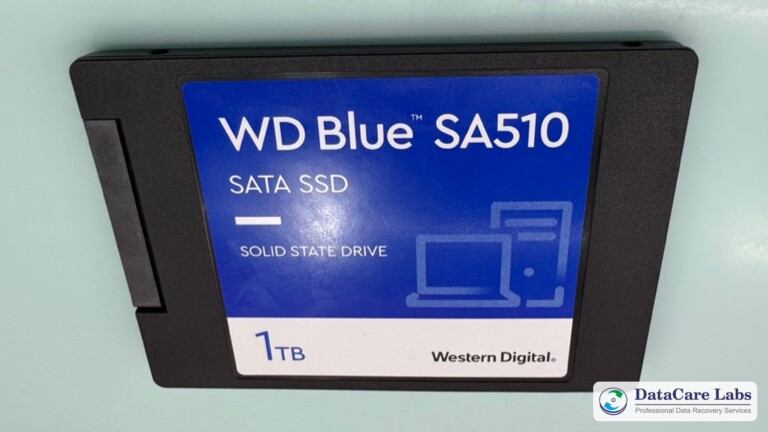
SATA and NVMe SSDs such as WD Blue, WD Green and WD_BLACK, including WD Blue SA510
SSD data recovery →WD RAID array data recovery
WD drives in RAID 0, 1, 5, 6 and 10 on hardware or software RAID
RAID data recovery →WD laptop drive data recovery
WD hard drives and SSDs from laptops and all-in-one PCs
Laptop data recovery →WD data recovery: common drive failures
Clicking or beeping drive
Usually, the read/write heads have failed or the motor is stuck. So we replace the heads in our Class 100 clean room, and then image the platters.
Not detected or wrong capacity
The drive is missing in BIOS or shows the wrong size. Often, this is a firmware or service-area fault, which we repair before imaging.
Bad sectors and very slow reading
The media is weak. Therefore, hardware imagers read gently around bad areas, and no file system repair runs on your original drive.
Dropped My Passport or Elements
Portable drives often suffer head damage when dropped. Also, on many of them the USB port sits on the drive’s own board, so do not move the drive to another case.
Burnt or dead circuit board
This happens after a power surge or a wrong adapter. However, on modern drives the board cannot simply be swapped, so we handle it in the lab.
NAS, RAID and SSD failures
For instance, several WD Red drives fail in a NAS, or a WD SSD has a controller or NAND fault. In both cases, we rebuild the array or read the SSD.
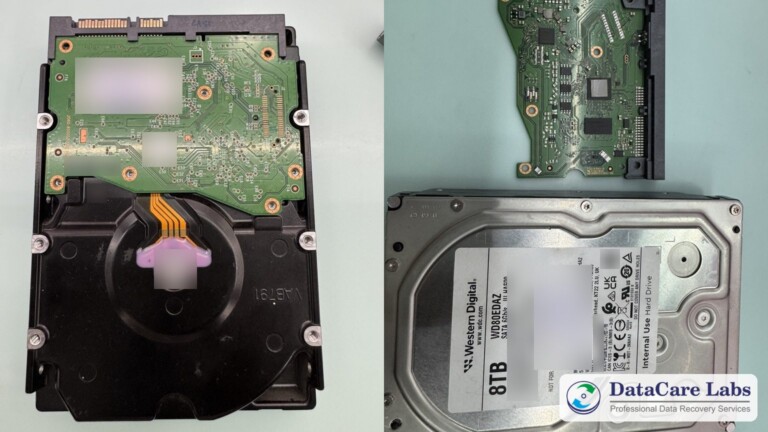
WD data recovery case studies
How your data is protected at our Pune lab
WD warranty claim and data recovery: questions
Will a WD warranty claim recover my data?
No. WD states that it does not provide data recovery services, and its warranty policy says you are responsible for your data and should back it up before seeking service. An approved claim gives you a repaired or replacement drive, not your files.
Is DataCare Labs an authorised WD service centre?
No. DataCare Labs is an independent data recovery laboratory in Pune, India. We recover data from WD drives, but we cannot approve, process or speed up WD warranty claims. For a warranty replacement, use WD’s Support Portal, your dealer or a WD drop point.
Will data recovery void my WD warranty?
WD states that using a data recovery service will not void the warranty on a drive bought from a WD reseller or distributor, if the service provider gives you written verification on its company letterhead. However, misuse, tampering or alteration still void the warranty under WD’s policy.
Can I recover my data and still make a WD warranty claim?
Yes, in the way WD describes. First, tell us at the free analysis that you want to claim the warranty. Then, after the recovery, we give you a written verification on DataCare Labs letterhead that we performed data recovery on your drive, plus any other document WD asks for. Finally, you submit the claim with WD. The warranty decision is WD’s.
Should I make a WD warranty claim or recover my data first?
If you need the files, recover them first. WD asks you to back up before seeking service and does not recover data itself. On the other hand, if you only need a working drive, you can go straight to WD’s claim process.
What do I need for a WD warranty claim?
A WD Support account, the drive’s serial number, the place and date of purchase, and proof of purchase. WD also asks for clear pictures of the product label showing the part and serial numbers.
Where do I hand in a WD drive for a warranty claim in India?
After you get a Warranty Replacement (RMA) number, ship the drive to WD’s RMA address or walk in to one of WD’s drop points, which WD lists for cities including Pune, Mumbai, Delhi and Bengaluru. WD says its warehouse does not accept walk-ins.
Who handles the warranty for WD SSDs?
WD’s policy page says WD brand flash and SSD products have a separate SanDisk Limited Warranty, and WD points SSD and flash support to SanDisk. We recover data from WD SSDs either way.
Which WD drives does DataCare Labs recover?
WD Blue, WD Black, WD Red, WD Purple, WD Gold and Ultrastar hard drives; My Passport, Elements, My Book and WD_BLACK external drives; and WD SATA and NVMe SSDs — single drives, NAS units and RAID arrays.
How much does WD data recovery cost, and how long does it take?
The price depends on the fault, not on the brand. The analysis is free, you get a firm quote before any work starts, and if we cannot recover your data you pay nothing. Most single-drive cases take 24 to 48 hours after you approve the quote.
Can customers outside India send a WD drive?
Yes. Customers abroad ship the drive to our Pune lab, or we can arrange a chargeable doorstep pickup. Pickup is free across India.
Still unsure? Call DataCare Labs: +91 98600 70809 — the analysis is free.
Data recovery reviews, in our customers’ own words
Real customers describing their own data recovery — hard disk, SSD, laptop, external drive and server cases handled at our clean-room lab in Pune. Each review is filmed with the device that came in, from cities across India and from customers who ship their drives to us from abroad.

Years of PhD Research Recovered from a Crashed Laptop | 100% Data Recovery

Data Recovery from Mexico to India | 2TB MacBook HDD Recovery Success Story

6TB External Hard Drive Data Recovery | VS Films

EVM M.2 SSD Data Recovery Success | Akhil Shares His Experience

Pen Drive Data Recovery from Scotland, UK | Data Recovered in 48 Hours
Tell us what failed. We’ll analyse it free, in 25-30 minutes.
We offer Free Pickup And Delivery services across India. Pickup from outside India is chargeable. This convenient service ensures a hassle-free experience for our customers, making data recovery easier and more accessible.
Official sources
Manufacturer information on this page is summarised from WD’s own published pages, linked below. Terms can change and can differ by country — always check the current version on WD’s website before you make a claim. Last verified: 10 November 2026.
- Warranty Policy, WD India (opens the official site in a new tab)
- Answer 33498: Warranty Replacement and Data Recovery (opens the official site in a new tab)
- Answer 30058: Steps to Create a Warranty Replacement Claim (opens the official site in a new tab)
- Answer 2: Product Warranty Periods (opens the official site in a new tab)
- Data Recovery and warranty statement (opens the official site in a new tab)
- RMA Addresses and India drop points (opens the official site in a new tab)
- Contact Customer Support (opens the official site in a new tab)
- Warranty Status Check (opens the official site in a new tab)
- Authorised Distributors (opens the official site in a new tab)
- SanDisk Support (WD SSD and flash) (opens the official site in a new tab)
Western Digital, WD, WD Blue, WD Black, WD_BLACK, WD Red, WD Purple, WD Gold, My Passport, My Book, Elements, My Cloud and Ultrastar are trademarks of Western Digital Corporation or its affiliates; SanDisk is a trademark of its owner. DataCare Labs is not affiliated with, endorsed by or an authorised service provider of Western Digital; brand names are used only to describe compatibility.
Related DataCare Labs pages
- ServiceHard Disk Data RecoveryClicking, dead and bad-sector hard drives.
- ServiceExternal Hard Drive RecoveryDropped, undetected or failed USB drives.
- ServiceNAS Data RecoveryFailed NAS units and RAID volumes.
- ServiceSSD Data RecoverySATA and NVMe SSDs that stopped working.
- GuideWD Warranty CheckCheck your WD warranty and keep your data.
- GuideWD Customer Care IndiaWD India contacts, drop points and RMA.
- ServiceInternational Data RecoverySend your drive to our Pune lab from abroad.
- PricingData Recovery CostWhat recovery costs and what changes the price.
- ShippingPacking & Shipping InstructionsPack your drive safely for the courier.