Seagate Warranty Claim & Data Recovery Support
Your Seagate drive has failed and you need two answers: how a Seagate warranty claim works, and how to get your files back. So this page brings together Seagate’s official warranty, RMA and service-centre links, explains what a warranty replacement does and does not cover, and shows how DataCare Labs recovers data from failed Seagate hard drives, external drives, NAS drives and SSDs.
DataCare Labs is an independent data recovery laboratory in Pune, India. We are not Seagate, not a Seagate authorised service centre, and we cannot approve or process Seagate warranty claims.


Seagate warranty claim vs DataCare Labs data recovery
| Seagate warranty / RMA | DataCare Labs data recovery | |
|---|---|---|
| What it is for | Replacing a defective product under Seagate’s limited warranty. | Recovering the files stored on your failed drive. |
| Your data | Not covered — the warranty “does not cover data loss”. Seagate says it overwrites data on returned products. | Recovering your data is the whole service. You check the recovered files before you pay. |
| Your original drive | Sent to Seagate and not returned; ownership transfers to Seagate. | Your drive remains your property. |
| What you receive | A functionally equivalent replacement, which may be a re-certified unit. | Your recovered files, on your own drive or by secure cloud delivery. |
| Cost | Replacement at no charge if the claim is approved; you prepay shipping to Seagate. | Free analysis and a firm quote before any work. No Data – No Charge. |
| Warranty effect | Void if labels are removed or tampered with, or the cover or components are removed without authorisation. | Want to keep the warranty? Get Seagate’s approval for a third-party lab first. We give you our lab documents for Seagate, and after recovery the documents for your claim. |
Check warranty, start a Seagate warranty claim, find a service centre
These links go to Seagate’s own website. Warranty decisions, replacements and service-centre appointments are made only by Seagate and its authorised partners.
Seagate warranty claim rules by product type
Seagate publishes different warranty statements for different product types. The summaries below quote or closely follow Seagate’s own text. However, they are not legal advice. So read the full document for your product and region, and check your status with Seagate’s warranty tool.
Seagate Limited Warranty
- Covers Seagate, Maxtor and LaCie consumer products (Business Storage/NAS products have their own statement).
- Covers defects in material or workmanship in the new product.
- Only consumers who bought from an authorised retailer or reseller can obtain coverage.
- The warranty period is the one shown on your product packaging; check it with Seagate’s warranty tool.
- In the European Economic Area you receive the longer of the product warranty period or two years.
- Does not cover data loss; costs related to data recovery are not recoverable under the warranty.
- Void if the product is returned with removed, damaged or tampered labels, or with unauthorised removal of components or the cover.
- The replacement may be a re-certified unit; the original is not returned.
Source: Seagate Limited Warranty (opens the official site in a new tab) · Rev. August 29, 2024
Business Storage/NAS Limited Warranty
- Seagate’s separate statement for its Business Storage/NAS products.
- Covers defects in material or workmanship in the new Seagate product.
- Only purchasers from an authorised Seagate retailer or reseller can obtain coverage.
- Does not cover data loss; data recovery, removal and installation costs are not recoverable.
- Void with removed, damaged or tampered labels or unauthorised removal of components or covers.
- The product you send is not returned; the replacement may be re-certified.
- Business buyers: read this document to confirm which terms apply to your product.
Source: Business Storage/NAS Products Limited Warranty (opens the official site in a new tab) · Rev. August 29, 2024
Seagate Channel Limited Warranty
- Applies to Seagate non-retail bare drive or SSD products bought through the Seagate distribution channel.
- Only customers who bought from a Seagate authorised reseller or distributor can obtain coverage.
- Warranty service only when the product is returned to an authorised return centre in the region where Seagate first shipped it.
- Some regions are country-restricted: products cannot be returned outside the country. Seagate lists the India region (including Bangladesh, Nepal, Pakistan and Sri Lanka) among them.
- Does not cover data loss; back up regularly.
- Void with removed, damaged or tampered labels or any alterations.
Source: Seagate Channel Limited Warranty (opens the official site in a new tab) · Rev. July 3, 2025
Where you can make a Seagate warranty claim
Seagate asks you to make a claim through the authorised distributor or reseller you bought from, and states that to claim within a jurisdiction or region you should buy from an authorised distributor in that same region. If you bought from an authorised seller in another region, Seagate says you need to make the claim with that seller directly. Authorised sellers are listed on Seagate’s where-to-buy page.
Drives built into computers or systems: Seagate’s OEM warranty statement says any warranty to end users comes from the OEM customer, not from Seagate — so for a drive that came inside a laptop, desktop or server, start with the system maker.
How a Seagate warranty claim works
This is the return process Seagate describes in its warranty statements. However, always follow Seagate’s own pages for the exact, current steps in your country.
- Check the warrantyUse Seagate’s warranty tool with the drive’s serial number (and BPID, part number or capacity if asked).
- Start the claimOpen a claim on Seagate’s Start Claim page, or contact the authorised reseller or service centre.
- Get a Return Order NumberAfter approval, Seagate asks for your name, address, phone, e-mail and serial number and issues a Return Order Number.
- Back up or recover firstSeagate says the product you send will not be returned, and that you should delete data before returning. Recover what you need before shipping.
- Pack and shipOriginal packaging or equal protection, shipping prepaid with tracking, to the address on your Return Order Number.
- Receive the replacementSeagate replaces the product with a functionally equivalent one, possibly re-certified, covered for the rest of the original warranty or 90 days, whichever is longer.
Recover your data and keep your Seagate warranty claim
Many customers want both: their files back and a warranty replacement. So here is how DataCare Labs works with you on that. The warranty decision is always Seagate’s — we provide the documents, and you submit the claim.
- Call Seagate customer care firstFirst, before any recovery work, tell Seagate that a third-party data recovery lab needs to recover your data, and ask for their approval to keep the warranty claim open. Get the answer in writing, with a case number.
- Send them our lab documentsNext, Seagate may ask which lab will do the recovery. We give you DataCare Labs’ company and certification documents to share with them, including our ISO 14644-1 clean-room, ISO 9001 and ISO 27001 certificates.
- We recover your dataThen we follow what Seagate approved, and we tell you before any step that needs the drive opened in our clean room.
- We give you the claim documentsFinally, after the recovery, we give you the documents Seagate asks for. You submit them with your warranty claim, and Seagate processes the claim.
We provide every document a Seagate service centre asks for. Tell us at the free analysis that you plan to claim the warranty, so we plan the recovery around it.
Seagate service centres for your warranty claim
Service-centre locator
Seagate’s service-centre locator lists authorised support centres by country — select your country to see addresses and opening hours. Seagate notes that a return order is required before it accepts a warranty claim, so open a claim first.
However, a Seagate service centre handles warranty service. It does not recover your files, so for that you need a data recovery lab.
Contacting Seagate about a warranty claim
Seagate’s Contact Us page offers live chat for product and technical questions, chat for Seagate Store orders, and a support escalation form for customers who already have an open case. Seagate publishes the chat hours on that page.
Also, we do not list Seagate phone numbers here. Instead, use the contact page for the current options in your country.
Data-loss precautions before a Seagate warranty claim
A failing drive can lose more data every time it is powered on. Therefore, these steps protect your chances, whether you choose a warranty claim, data recovery, or both.
Do
- Stop using the drive as soon as it clicks, beeps, disappears or slows down.
- Decide first: do you need the data, the replacement, or both?
- Note the model, capacity and serial number from the label.
- Check the warranty and any Rescue Data Recovery coverage with Seagate.
- Get a free analysis before you ship the drive anywhere.
- Want the warranty too? Ask Seagate customer care to approve third-party data recovery, in writing, before any work.
Do not
- Do not send the drive for RMA if you still need its data.
- Do not open the drive or remove labels, screws or the circuit board.
- Do not run CHKDSK, formatting or repair tools on a failing drive.
- Do not keep power-cycling a clicking or beeping drive.
- Do not freeze, tap or shake the drive.
Seagate data recovery: drives we recover
Seagate internal hard drive data recovery
BarraCuda, BarraCuda Compute, FireCuda HDD and SSHD, 3.5" and 2.5" laptop drives
Hard disk data recovery →Seagate external drive data recovery
Expansion, One Touch, Backup Plus, and LaCie Rugged and d2 drives
External hard drive recovery →Seagate NAS drive data recovery
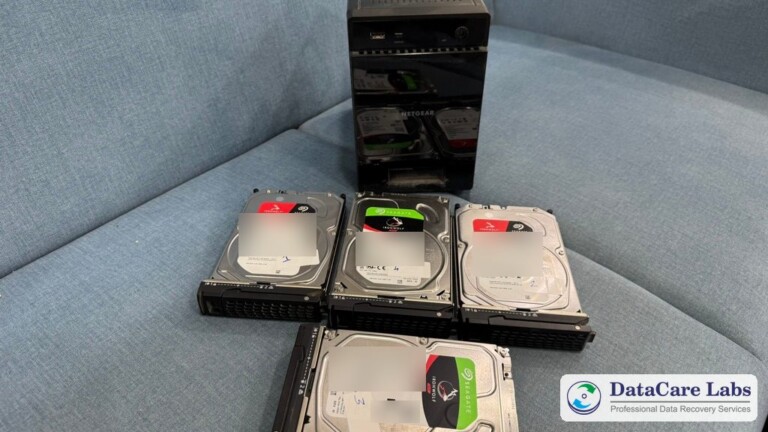
IronWolf and IronWolf Pro drives, single disks or full NAS arrays
NAS data recovery →Seagate enterprise and server drive data recovery
Exos SATA and SAS drives, in servers and RAID arrays
Server data recovery →Seagate surveillance drive data recovery
SkyHawk drives from DVRs and NVRs
CCTV and DVR data recovery →Seagate SSD data recovery
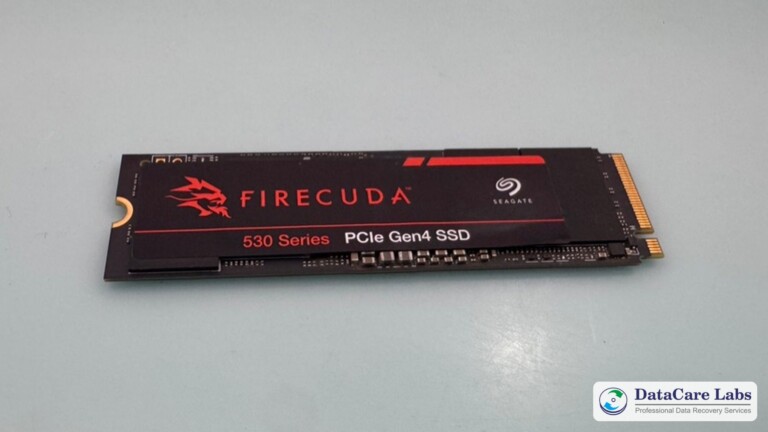
FireCuda and BarraCuda SATA and NVMe SSDs, including FireCuda 530
SSD data recovery →Seagate RAID array data recovery
Seagate drives in RAID 0, 1, 5, 6 and 10 on hardware or software RAID
RAID data recovery →Seagate older drive data recovery
Maxtor DiamondMax and older Seagate models
Hard disk data recovery →Seagate data recovery: common drive failures
Clicking or beeping drive
Usually, the read/write heads have failed or the motor is stuck. So we replace the heads in our Class 100 clean room, and then image the platters.
Not detected or wrong capacity
The drive is missing in BIOS or shows the wrong size. Often, this is a firmware or service-area fault, which we repair before imaging.
Bad sectors and very slow reading
The media is weak. Therefore, hardware imagers read gently around bad areas, and no file system repair runs on your original drive.
Burnt or dead circuit board
This happens after a power surge or a wrong adapter. However, on modern drives the board cannot simply be swapped, so we handle it in the lab.
Dropped external drive
For example, portable drives like One Touch and Expansion often suffer head damage when dropped. So do not keep reconnecting them.
NAS, RAID and SSD failures
For instance, several IronWolf drives fail in a NAS, or a FireCuda SSD has a controller or NAND fault. In both cases, we rebuild the array or read the SSD.
Seagate data recovery case studies
How your data is protected at our Pune lab
Seagate warranty claim and data recovery: questions
Will a Seagate warranty claim recover my data?
No. Seagate’s limited warranty states that it does not cover data loss. An approved claim gives you a replacement drive, and the drive you send is not returned. Some Seagate products include Rescue Data Recovery Services: check coverage with your serial number on Seagate’s data recovery services page.
Is DataCare Labs an authorised Seagate service centre?
No. DataCare Labs is an independent data recovery laboratory in Pune, India. We recover data from Seagate drives, but we cannot approve, process or speed up Seagate warranty claims. For a warranty replacement, use Seagate’s official claim page or an authorised service centre.
Should I make a Seagate warranty claim or recover my data first?
If you need the files, recover them first. Seagate does not return the drive you send for RMA, and it says it overwrites data on returned products. On the other hand, if you only need a working drive, you can go straight to Seagate’s claim process.
Will data recovery void my Seagate warranty?
It can. Seagate’s warranty is void if the drive comes back with removed, damaged or tampered labels, or with unauthorised removal of components or the cover. Some recoveries, such as a head replacement, require opening the drive in a clean room. That is why we explain what your drive needs at the free analysis, before any such step. If you want to keep the warranty, ask Seagate customer care to approve the third-party recovery first.
Can I recover my data and still claim my Seagate warranty?
Often, yes, if Seagate approves it. Call Seagate customer care before any recovery work, explain that a third-party lab needs to recover your data, and get their answer in writing. If Seagate asks about the lab, we give you DataCare Labs’ company and certification documents. After the recovery, we give you the documents Seagate asks for, and you submit them with your claim. The warranty decision is Seagate’s.
What do I need to check my Seagate warranty and make a claim?
The serial number from the drive label. Seagate’s warranty tool may also ask for the last 4 digits of the BPID, the part number or the capacity, depending on the product.
Can I claim a Seagate warranty in another country?
It depends on the product. Seagate asks consumers to claim through the authorised seller they bought from, and to buy from an authorised distributor in the same region. For channel bare drives and SSDs, warranty service is only given in the region where Seagate first shipped the product, and some regions, including India, are country-restricted.
Which Seagate drives does DataCare Labs recover?
BarraCuda, FireCuda, IronWolf, Exos and SkyHawk hard drives; Expansion, One Touch, Backup Plus and LaCie external drives; and Seagate SATA and NVMe SSDs — single drives, NAS units and RAID arrays.
How much does Seagate data recovery cost, and how long does it take?
The price depends on the fault, not on the brand. The analysis is free, you get a firm quote before any work starts, and if we cannot recover your data you pay nothing. Most single-drive cases take 24 to 48 hours after you approve the quote.
Can customers outside India send a Seagate drive?
Yes. Customers abroad ship the drive to our Pune lab, or we can arrange a chargeable doorstep pickup. Pickup is free across India.
Still unsure? Call DataCare Labs: +91 98600 70809 — the analysis is free.
Data recovery reviews, in our customers’ own words
Real customers describing their own data recovery — hard disk, SSD, laptop, external drive and server cases handled at our clean-room lab in Pune. Each review is filmed with the device that came in, from cities across India and from customers who ship their drives to us from abroad.

Years of PhD Research Recovered from a Crashed Laptop | 100% Data Recovery

Data Recovery from Mexico to India | 2TB MacBook HDD Recovery Success Story

6TB External Hard Drive Data Recovery | VS Films

EVM M.2 SSD Data Recovery Success | Akhil Shares His Experience

Pen Drive Data Recovery from Scotland, UK | Data Recovered in 48 Hours
Tell us what failed. We’ll analyse it free, in 25-30 minutes.
We offer Free Pickup And Delivery services across India. Pickup from outside India is chargeable. This convenient service ensures a hassle-free experience for our customers, making data recovery easier and more accessible.
Official sources
Manufacturer information on this page is summarised from Seagate’s own published pages, linked below. Terms can change and can differ by country — always check the current version on Seagate’s website before you make a claim. Last verified: 10 November 2026.
- Seagate — Warranty & Replacements (opens the official site in a new tab)
- Seagate Limited Warranty (consumer) (opens the official site in a new tab)
- Business Storage/NAS Products Limited Warranty (opens the official site in a new tab)
- Seagate Channel Limited Warranty (opens the official site in a new tab)
- OEM Warranty Statement (opens the official site in a new tab)
- Data Overwriting Process for Returned Products (opens the official site in a new tab)
- Warranty Void Checklist (opens the official site in a new tab)
- Seagate Service Centers (opens the official site in a new tab)
- Seagate Contact Us (opens the official site in a new tab)
- Seagate Rescue Data Recovery Services (opens the official site in a new tab)
- Seagate Support home (opens the official site in a new tab)
Seagate, BarraCuda, FireCuda, IronWolf, Exos, SkyHawk, One Touch, Expansion, LaCie and Maxtor are trademarks of Seagate Technology LLC or its affiliates. DataCare Labs is not affiliated with, endorsed by or an authorised service provider of Seagate; brand names are used only to describe compatibility.
Related DataCare Labs pages
- ServiceHard Disk Data RecoveryClicking, dead and bad-sector hard drives.
- ServiceExternal Hard Drive RecoveryDropped, undetected or failed USB drives.
- ServiceNAS Data RecoveryFailed NAS units and RAID volumes.
- ServiceSSD Data RecoverySATA and NVMe SSDs that stopped working.
- GuideSeagate Warranty CheckCheck your Seagate warranty and keep your data.
- GuideSeagate Service Centre IndiaSeagate India contacts, service centres and RMA.
- ServiceInternational Data RecoverySend your drive to our Pune lab from abroad.
- PricingData Recovery CostWhat recovery costs and what changes the price.
- ShippingPacking & Shipping InstructionsPack your drive safely for the courier.