Skip to content

QNAP Data Recovery in Punjab: Both NAS Drives Failed, Years of CA Firm Data Back
Case Overview : QNAP Data Recovery for a CA Firm in Punjab
This QNAP data recovery began when both drives in a Punjab CA firm’s QNAP NAS developed weak read/write heads. As a result, the RAID 0 volume went offline with many years of client records on it, so the firm needed NAS RAID 0 recovery. In our Class 100 clean room, the WD Red data recovery started with new heads for both drives; then we cloned them and rebuilt the RAID 0. Within 4 days, the firm had 100% of its data back.
We offer NAS data recovery for every office in India, with free pickup from Punjab and every other state, and from across Pune and Pimpri-Chinchwad.
- Brand : QNAP NAS with WD Red drives
- Drives : 2 × WD Red 6TB (WD60EFRX) NAS drives
- RAID Level : RAID 0, two drives
- Problem : Weak heads on both drives
- Method : Head replacement + clone + RAID 0 rebuild
- Success Rate : 100% in 4 days
Problem Description: A CA Firm's QNAP NAS Went Offline
A chartered accountancy firm in Punjab kept all its work on one QNAP NAS. It held years of client folders: income tax returns, audit files, GST returns and Tally company data. Years earlier, the two 6TB drives had been set up as RAID 0, to use the full 12TB of space.
However, RAID 0 keeps no second copy of anything. Instead, it splits every file across both drives, so the NAS needs both of them. First, the NAS became slow and dropped one drive for a moment. Then the shared folders vanished, and the QNAP showed the storage pool as failed. The staff restarted the NAS twice and then switched it off. After that, they called us, and we arranged a free pickup from Punjab. That is how this QNAP data recovery began.
The symptoms included:
- The NAS slowing down, then dropping a drive
- Every shared folder missing at once
- The storage pool shown as failed after a restart
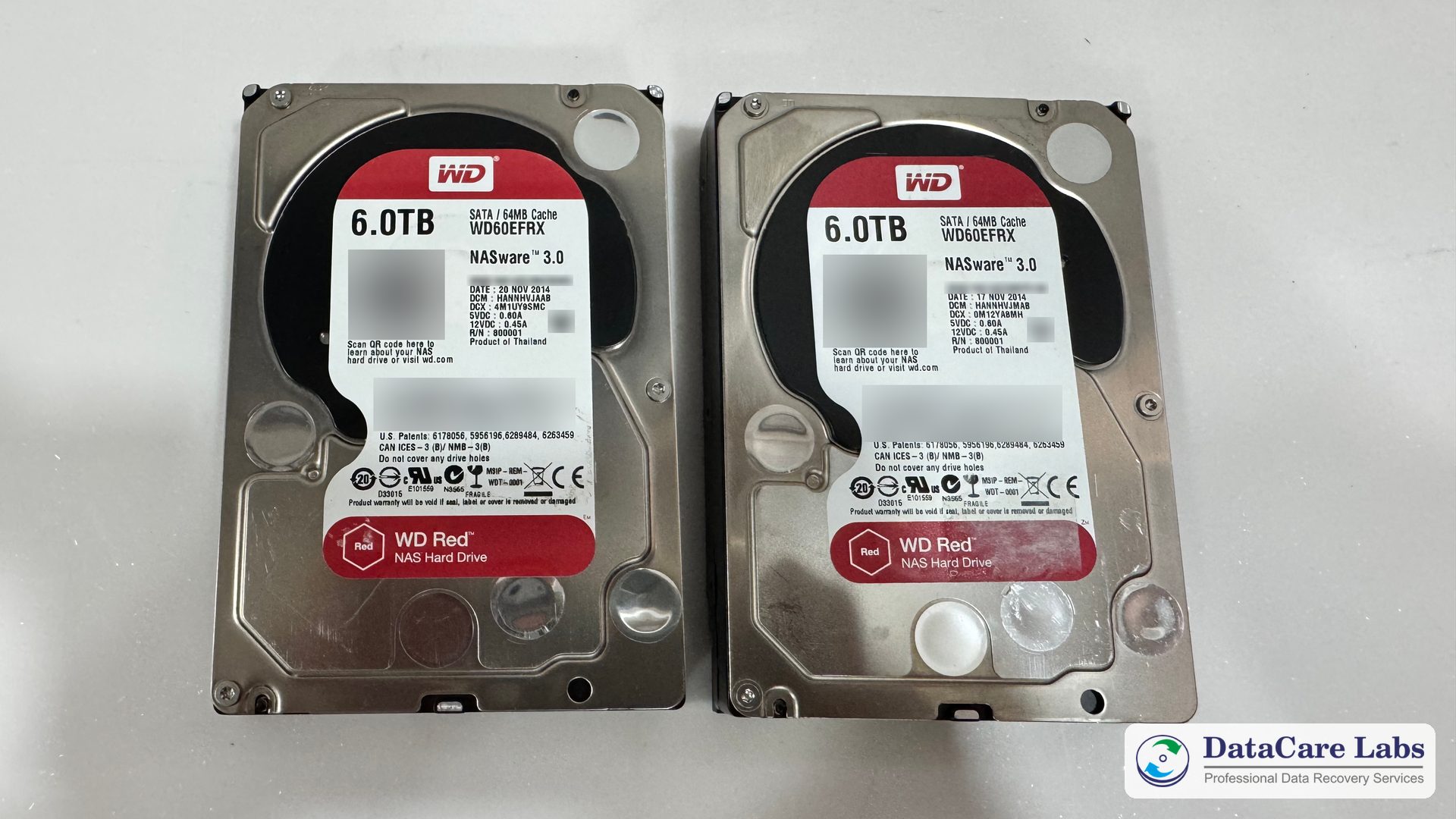
The photo above shows the label side of both drives. They are WD Red 6TB NAS drives (model WD60EFRX), a common choice in a QNAP, so WD Red data recovery is regular work in our lab. The labels show that both were made in November 2014, so the drives had worked for about 12 years. For privacy, we blurred their serial numbers, barcodes and QR codes.
Understanding the Challenge: Why NAS RAID 0 Recovery Needs Both Drives
In a RAID 0, the NAS writes each file in small blocks, in turn, to both drives. So neither drive holds a whole file. When one drive fails, the whole volume stops. Here, both drives had weak heads, so NAS RAID 0 recovery meant repairing two drives, not one.
Weak heads read slowly and miss sectors. Moreover, every extra hour of use can scratch the platters, and a scratched platter can lose data for good. That is why the firm did the right thing when it switched the NAS off.
There were three more risks:
- Starting a RAID rebuild, or creating a new volume, would have overwritten the data
- Recovery software cannot read a drive whose heads are failing
- Moving the drives to another NAS could have started a sync that writes to them
So we never powered the drives on before the repair. Instead, the work started in our clean room.
WD Red Head Replacement in Our Class 100 Clean Room
Like every WD Red data recovery with weak heads, this one began with a safe test in our lab. Both drives spun up, but their heads were too weak to read the platters properly. Next, in our Class 100 clean room, we opened each drive and replaced its heads with healthy donor heads from matching WD Red 6TB drives. Our stock of over 20,000 donor drives meant we had the right parts at once.
Then we cloned each drive with a hardware imager. It reads every sector once, slowly and with care, and skips past weak areas before going back to them. That way, a new set of heads only needs to last for one careful read.
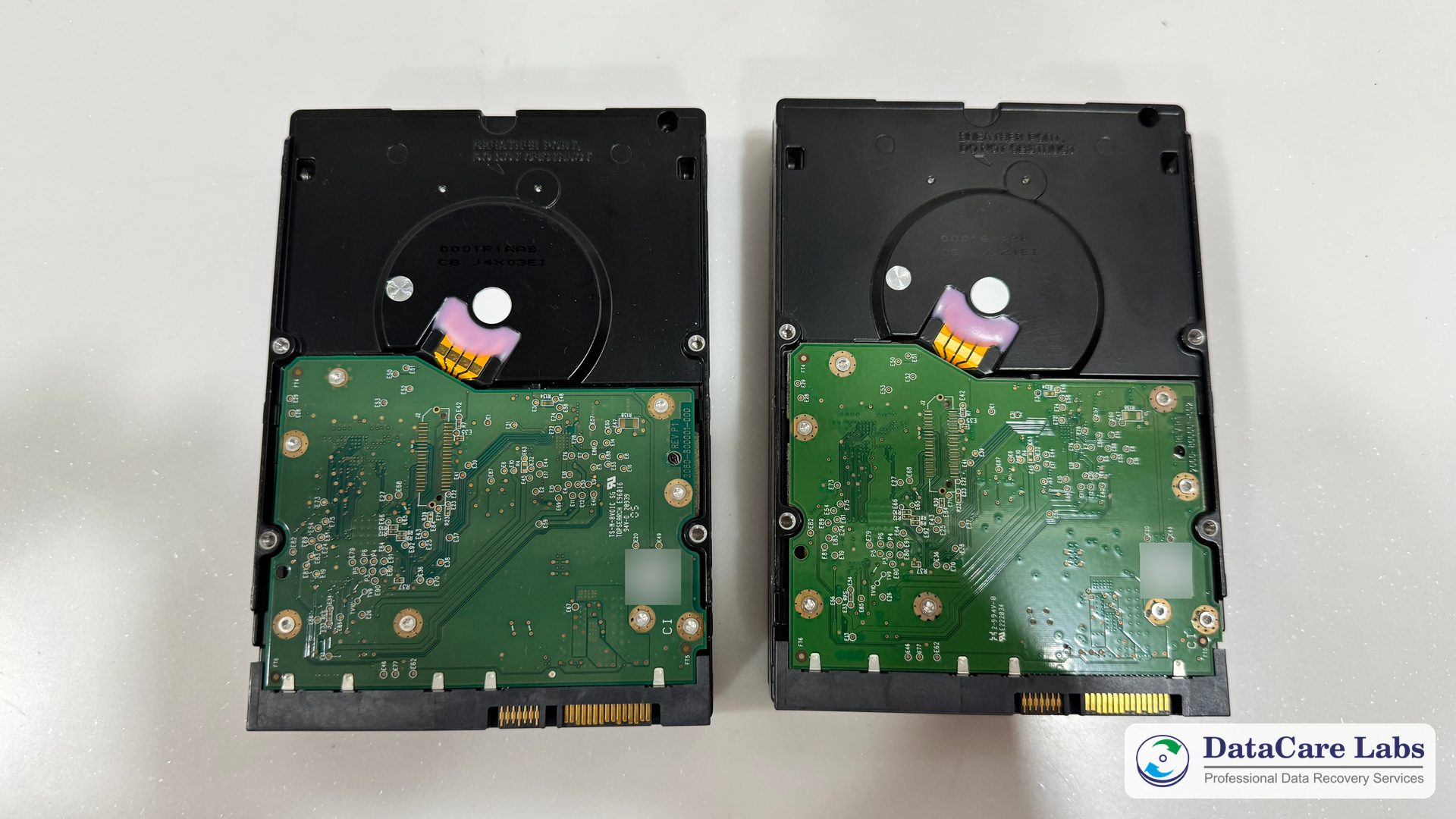
This is the circuit-board side of the same two drives. Both boards were fine; the fault was inside, in the heads. For privacy, we blurred the data stickers on the boards. Learn more about this work on our hard disk data recovery page.
Rebuilding the QNAP RAID 0 from the Clones
With both clones ready, we put the original drives safely aside. From then on, we worked only on the copies.
A QNAP NAS builds its volumes with Linux software RAID. So we read the RAID details on each clone, then checked the drive order and the stripe size against the data itself. After that, we rebuilt the RAID 0 in our lab, without writing a single byte to the client’s drives. Finally, we opened the volume and checked the firm’s folders: client files, Tally data and scanned documents all opened normally.
Read more on our RAID data recovery page, or see how we did a similar head replacement in a RAID 0 server in Pune.
Outcome of the QNAP Data Recovery: 100% in 4 Days
This NAS RAID 0 recovery brought back 100% of the firm’s data within 4 days. Every year of client records came back, with the folder structure the staff knew. Because the files are confidential, we delivered them on a new hard drive, and we deleted our working copies after 7 days, as described on our security measures page.
For the firm, this meant years of work were saved. In addition, the staff could open past returns and audit files again in the middle of the season. So the QNAP data recovery saved both their records and their deadlines.
Read about another NAS in our Netgear NAS RAID 5 recovery in Hyderabad.
Lessons for Offices That Keep Years of Records on a NAS
A NAS feels safe because it is always on. However, a RAID 0 NAS is less safe than a single drive, because it needs every drive to work. Here are four simple steps:
- Use RAID 1 or RAID 5 instead of RAID 0, so one failed drive does not stop the NAS
- Keep a second copy of the NAS, on another drive or in the cloud, because RAID is not a backup
- Replace NAS drives as they age; these had run for about 12 years
- When the NAS slows down or drops a drive, switch it off and call a lab
Under warranty? Our QNAP warranty guide and WD warranty guide explain how to get your data first and then claim the warranty.
QNAP Data Recovery: Frequently Asked Questions
Answers for offices in Punjab, Pune, Pimpri-Chinchwad or anywhere in India whose QNAP NAS, RAID 0 volume or NAS drives need recovery.
QNAP NAS down? Call +91 9859 070809 — the analysis is free.
QNAP NAS or RAID 0 Not Working?
Switch the NAS off, and do not rebuild, repair or initialize the volume. Each of those steps can overwrite your data. Instead, call our engineers for QNAP data recovery, WD Red data recovery or data recovery in Punjab and anywhere in India. We check the drives for free and tell you what we can recover before you pay anything.
We offer free pickup from anywhere in India, including Punjab, and across Pune and Pimpri-Chinchwad. If you send the drives yourself, follow our packing instructions. You can also start with a free analysis or see our business data recovery service.
Related
- Data Recovery Services in Pune
- Data Recovery in Pimpri-Chinchwad
- NAS Data Recovery
- RAID Data Recovery
- QNAP Warranty and Support Guide
- WD Warranty Claim Guide
- Hard Disk Data Recovery
- Business Recovery Service
- RAID 0 Server Recovery in Pune
- Netgear NAS RAID 5 Recovery in Hyderabad
- How We Keep Your Data Safe
- Contact DataCare Labs, Pune
Trusted by Customers Across India
DataCare Labs is trusted across Pune, all over India and by customers overseas for professional data recovery. With advanced tools, certified clean-room facilities, and expert engineers, we deliver secure, fast, and reliable recovery solutions—whether you’re in Maharashtra or overseas. Experience unmatched care and precision for your valuable data.

Hello all, I’m Ishwar from Akole Sangamner. I am a professional photographer. I had my 500gb hard drive, which was not detectable by any system. But I’m very thankful to Datacare Labs to recover my all data from Seagate hard drive. I recommend to everyone this is the best Seagate data recovery center in pune.

Excellent service! I thought I had lost all my data when my HDD died, but the technically sound team at DataCare Labs was able to recover everything. They were professional, quick, and kept me informed throughout the process. Highly recommend them for any data recovery needs!

This team is a perfect example of what they say that’s only they delivers. Special thanks to Amol sir, for making my data recovery a smooth process. It was a very nice experience, and I’m very thankful for their efforts

Professionals from DataCare labs were like saviours for me. I lost my entire work data but the team was able to recover it successfully. The service was superfast as well. Thank you team.

Thanks to DataCare Labs for the recovery of my data from my hard disk. I thought I lost all my data and would never be able to recover it but it got recovered. And they explain everything very well in detail before starting the process and only after your approval they move ahead.

I recently experienced a hard disk failure, and DataCare Labs came to the rescue. Their HDD data recovery service is top-notch. The team at DataCare Labs in Baner, Pune, managed to recover all my important files and documents. I am extremely satisfied with their prompt and reliable service.

DataCare Labs saved me twice! Four years ago, they recovered my 2TB data after a virus wiped everything. Recently, they rescued my 1TB external hard drive after physical damage. Both times, they worked like magic—quick, professional, and at a reasonable cost. If you’ve lost data due to deletion, damage, or even a burnt drive, don’t panic—just go to DataCare Labs. Highly recommend for their expertise and excellent service! 🚀

These guys are extremely professional, offer solutions, have the expertise needed, and go above and beyond to be helpful. They patiently explain what is possible and not, offer alternatives, and are patient with non-tech people like me. I recommend 10/10 for any of your data recovery needs in Pune.

DataCare Labs offers top-notch service with a great work culture. They respond promptly, address all queries, and recover even corrupt data at reasonable rates. Their drive collection and delivery are seamless, and they keep you updated throughout the process. You can verify recovered data before payment, and they securely store a backup until confirmation. Regular updates via email, SMS, and WhatsApp make the experience smooth. Their service matches global standards—highly recommended! Special thanks to Mr. Amol Khadse. Wishing DataCare Labs continued success

After my laptop’s 1TB hard drive crashed, local recovery centers couldn’t help and charged high fees. After three weeks of frustration, a friend recommended DataCare Labs. They diagnosed my drive for free in just 5 minutes, explained the issue, and recovered all my data within two days at a reasonable price. Highly professional with advanced tools—truly a lifesaver! Highly recommended!