RAID 0 Data Recovery in Pune: Both Server Drives Failed, Every VM Back
Case Overview : RAID 0 Data Recovery for a Software Company in Baner
This RAID 0 data recovery in Pune began when both hard drives in a Baner software company’s HP server failed. As a result, every virtual machine on the server went offline. In our Class 100 clean room, we did a hard disk head replacement on both drives, cloned them and rebuilt the RAID 0. Finally, our virtual machine data recovery brought back 100% of the data, and every VM booted.
We offer RAID data recovery in Pune, from Baner to Hinjewadi, and across Pune, Pimpri-Chinchwad and the rest of India, with free pickup from your office.
- Brand : HP (HGST / Hitachi) server drives
- Drives : 2 × 2TB, 7200 RPM SATA
- RAID Level : RAID 0 with virtual machines
- Problem : Head failure on both drives
- Method : Head replacement + RAID 0 rebuild
- Success Rate : 100%
Problem Description: Both Drives in a RAID 0 Server Failed
A software company in Baner, Pune, ran its office on one HP server. On it, VMware ESXi hosted several virtual machines: a file server, an accounts server, a domain controller and the team’s development and test machines. Years earlier, the two 2TB drives had been set up as RAID 0, for speed and for the full 4TB of space.
However, RAID 0 keeps no spare copy of the data. Instead, it splits every file across both drives, so the server needs both of them to work. One morning, the server started clicking, and every VM went offline. Then the RAID controller marked the logical drive as failed. Their IT team restarted the server once, heard the clicking again and switched it off. After that, they called us, and we picked up the drives from Baner the same day. That is how this RAID 0 data recovery began.
The symptoms included:
- A clicking sound from the server
- Every virtual machine offline at once
- The RAID controller showing the logical drive as failed
- The VMware datastore missing after a restart
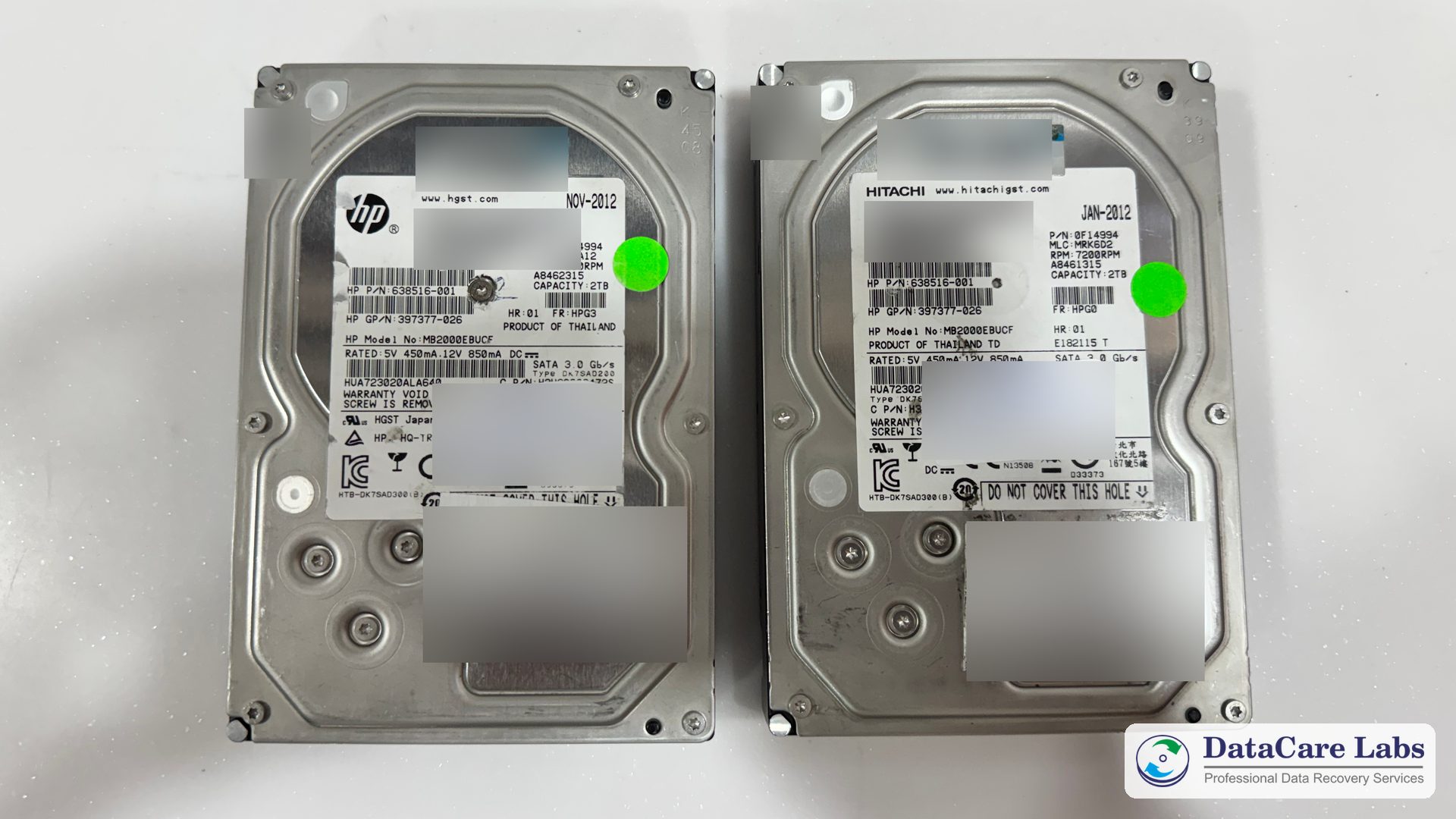
The photo above shows the label side of both drives. They are HP 2TB, 7200 RPM SATA server drives (HP model MB2000EBUCF), made by HGST, the former Hitachi drive business. The labels show that both were made in 2012, so the drives were about 14 years old. For privacy, we blurred their serial numbers, barcodes and job stickers.
Understanding the Challenge: Why RAID 0 Data Recovery Needs Both Drives
In a RAID 0, the controller writes data in small blocks, called stripes, and takes turns between the drives. So every large file, and every virtual disk, is split between both drives. With one drive missing, you only have half of each file. That is why RAID 0 data recovery needs every drive in the array to be readable.
Here, both drives had failed. A hard drive reads data with tiny read/write heads that float just above the spinning platters. When a head fails, the drive clicks, because it keeps searching for data it cannot read. In this case, one drive had a dead head, while the other had weak heads that could read only parts of the disk.
As a result, software could not help, because neither drive could be read in full. Even so, RAID 0 data recovery is possible when every drive can be repaired. Also, every restart risked scratching the platters. So both drives needed a hard disk head replacement in a clean room before anyone could copy the data.
Moreover, the virtual machines added one more layer. ESXi stores each VM as large virtual disk files (VMDK) on its own file system, called VMFS. Therefore, after the RAID rebuild, the virtual machine data recovery was only done once those files opened and booted.
To learn more, read what to do when a hard drive clicks, our guide to VMware and VMFS recovery and our post on VMDK file corruption.
Hard Disk Head Replacement and the RAID 0 Rebuild in Our Lab
Our engineers followed our step-by-step process for this RAID 0 data recovery:
- Tested both drives and confirmed a head failure on each one
- Matched donor heads from drives of the same model and family
- Did a hard disk head replacement on both drives in our Class 100 clean room
- Cloned each drive sector by sector on PC-3000, without writing to the originals
- Worked out the RAID 0 stripe size and drive order from the data itself
- Rebuilt the RAID 0 from the two clones and opened the VMware datastore
- Checked every virtual disk and booted every VM on our test system
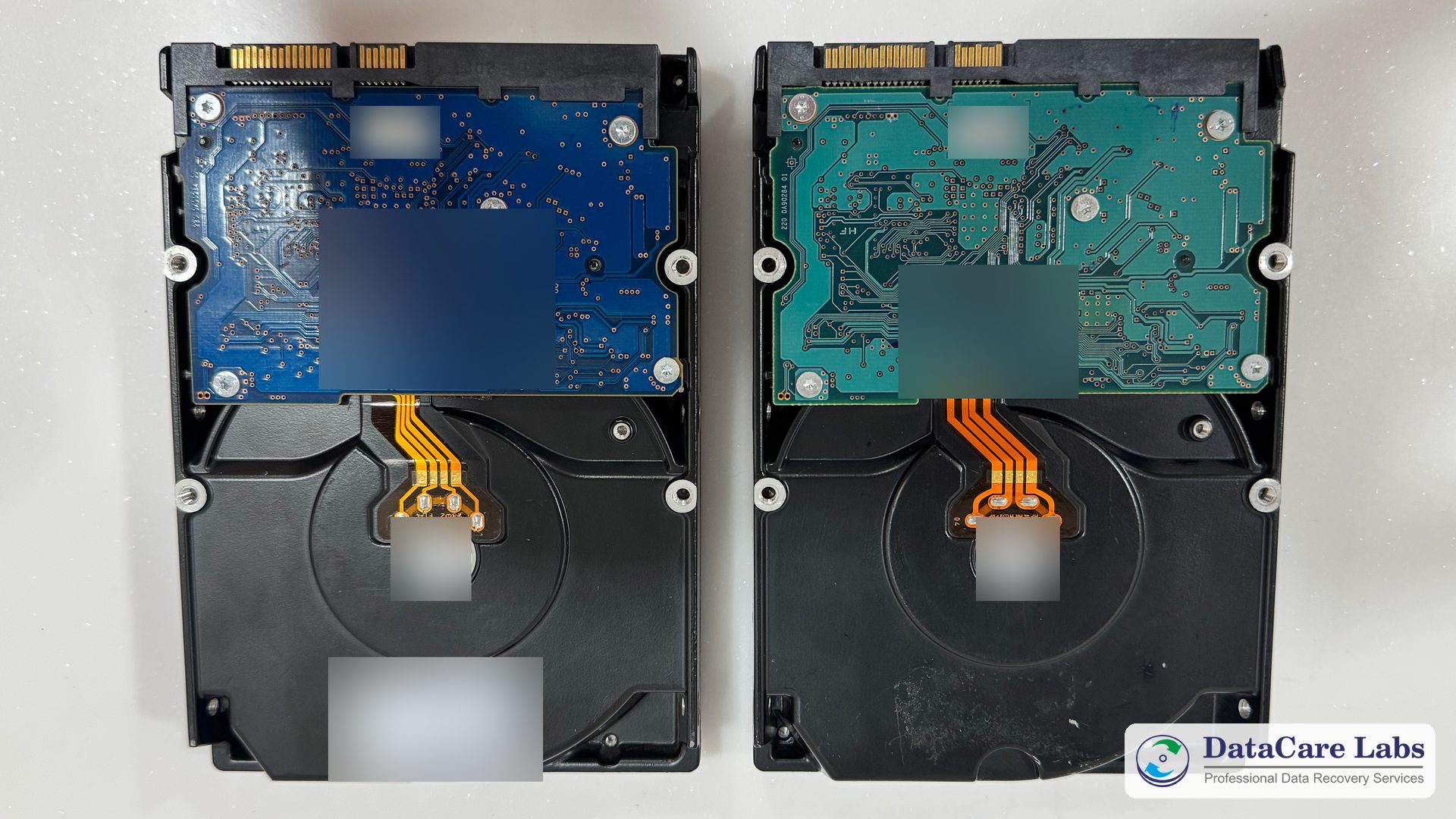
The photo above shows the circuit-board side of both drives. The heads sit inside the sealed case, so a head replacement must happen in a clean room, where dust cannot reach the platters. Without new heads, no RAID 0 data recovery would have been possible.
Virtual Machine Data Recovery: Every VM Booted
Because the clones held every sector, the rebuilt RAID 0 was complete. So the virtual machine data recovery went smoothly. First, the VMware datastore opened with every folder in place. Next, each virtual disk passed our checks. Finally, every VM started normally, with its files, accounts data and settings in place. That last check completed the RAID 0 data recovery.
To learn more, see our RAID recovery service, our server recovery service and our hard disk recovery service. Also, the hard disk recovery charges page explains how pricing works.
Outcome of the RAID 0 Data Recovery
This RAID 0 data recovery ended with 100% of the data back. In other words, the virtual machine data recovery was complete: every VM booted, and every file, database and setting was in place.
Then we delivered the VMs on new drives, ready to import, so the company’s IT team could start them on a new server. Our security measures kept the company’s data confidential, and we erased our copy 7 days after delivery.
More server and RAID cases: a Netgear NAS RAID 5 with two failed drives in Hyderabad, a Dell R740 RAID 6 server and a Synology NAS RAID 6. Head failure cases: a dropped WD 8TB from a wedding photographer and a Hitachi Ultrastar 4TB. Also browse all case studies and customer reviews.
Lessons for Businesses That Run Servers on RAID 0
RAID 0 is fast, but it doubles the risk: if either drive fails, the whole array stops. RAID 0 data recovery is often possible, but it is slow and costly. Still, a few habits keep a failed drive from stopping your business:
- Do not use RAID 0 for a server with business data; RAID 1, 5, 6 or 10 can survive a failed drive
- Back up your VMs every day to a separate device, and test a restore now and then
- Follow the 3-2-1 backup rule, with one copy outside the office
- Replace server drives before they get too old; these were about 14 years old
- If a server clicks, shut it down and do not restart it again and again
- Never run a RAID rebuild or a disk check on failing drives
For more help with RAID data recovery in Pune, read our guide to RAID, NAS and server recovery and see our business recovery service.
RAID 0 Data Recovery: Frequently Asked Questions
Answers for businesses in Pune, Pimpri-Chinchwad or anywhere in India whose RAID 0 server, virtual machines or failed hard drives need recovery.
RAID 0 server down? Call +91 9859 070809 — the analysis is free.
Server or RAID 0 Not Working?
Switch the server off and do not restart it again. Every restart can scratch the platters of a failing drive. Instead, call our engineers for RAID 0 data recovery in Pune or anywhere in India. We check the drives for free and tell you what we can recover before you pay anything.
We offer free pickup across Pune, from Baner and Hinjewadi to Pimpri-Chinchwad, and from anywhere in India. If you courier the drives yourself, follow our packing instructions and mark each drive with its slot number.
📞 Call DataCare Labs: +91 9859070809
🚚 Free Pickup & Delivery Available
🔒 100% Confidential Recovery Process
⚡ Free Analysis & Evaluation
✅ High Success Rate Data Recovery Services
Contact DataCare Labs today for expert RAID and server recovery.
Related
- Data Recovery Services in Pune
- Data Recovery in Pimpri-Chinchwad
- RAID Data Recovery
- Server Data Recovery
- Hard Disk Data Recovery
- Business Recovery Service
- Hard Disk Data Recovery Cost
- VMware and VMFS Recovery
- Netgear NAS RAID 5 Recovery in Hyderabad
- Dropped WD 8TB Recovery in Gujarat
- Data Recovery FAQ
- Contact DataCare Labs, Pune

Trusted by Customers Across India
DataCare Labs is trusted across Pune, all over India and by customers overseas for professional data recovery. With advanced tools, certified clean-room facilities, and expert engineers, we deliver secure, fast, and reliable recovery solutions—whether you’re in Maharashtra or overseas. Experience unmatched care and precision for your valuable data.

Hello all, I’m Ishwar from Akole Sangamner. I am a professional photographer. I had my 500gb hard drive, which was not detectable by any system. But I’m very thankful to Datacare Labs to recover my all data from Seagate hard drive. I recommend to everyone this is the best Seagate data recovery center in pune.

Excellent service! I thought I had lost all my data when my HDD died, but the technically sound team at DataCare Labs was able to recover everything. They were professional, quick, and kept me informed throughout the process. Highly recommend them for any data recovery needs!

This team is a perfect example of what they say that’s only they delivers. Special thanks to Amol sir, for making my data recovery a smooth process. It was a very nice experience, and I’m very thankful for their efforts

Professionals from DataCare labs were like saviours for me. I lost my entire work data but the team was able to recover it successfully. The service was superfast as well. Thank you team.

Thanks to DataCare Labs for the recovery of my data from my hard disk. I thought I lost all my data and would never be able to recover it but it got recovered. And they explain everything very well in detail before starting the process and only after your approval they move ahead.

I recently experienced a hard disk failure, and DataCare Labs came to the rescue. Their HDD data recovery service is top-notch. The team at DataCare Labs in Baner, Pune, managed to recover all my important files and documents. I am extremely satisfied with their prompt and reliable service.

DataCare Labs saved me twice! Four years ago, they recovered my 2TB data after a virus wiped everything. Recently, they rescued my 1TB external hard drive after physical damage. Both times, they worked like magic—quick, professional, and at a reasonable cost. If you’ve lost data due to deletion, damage, or even a burnt drive, don’t panic—just go to DataCare Labs. Highly recommend for their expertise and excellent service! 🚀

These guys are extremely professional, offer solutions, have the expertise needed, and go above and beyond to be helpful. They patiently explain what is possible and not, offer alternatives, and are patient with non-tech people like me. I recommend 10/10 for any of your data recovery needs in Pune.

DataCare Labs offers top-notch service with a great work culture. They respond promptly, address all queries, and recover even corrupt data at reasonable rates. Their drive collection and delivery are seamless, and they keep you updated throughout the process. You can verify recovered data before payment, and they securely store a backup until confirmation. Regular updates via email, SMS, and WhatsApp make the experience smooth. Their service matches global standards—highly recommended! Special thanks to Mr. Amol Khadse. Wishing DataCare Labs continued success

After my laptop’s 1TB hard drive crashed, local recovery centers couldn’t help and charged high fees. After three weeks of frustration, a friend recommended DataCare Labs. They diagnosed my drive for free in just 5 minutes, explained the issue, and recovered all my data within two days at a reasonable price. Highly professional with advanced tools—truly a lifesaver! Highly recommended!